Ultrasound reporting software retrieves modality measurements, performs analytics, and merges technologist/sonographer findings into the radiologist’s report to eliminate retypes or dictation. For a radiology department, the best ultrasound reporting software does that for every ultrasound exam, inside the dictation system radiologists already use, and keeps doing it even after software updates.
This page is a checklist for imaging centers and radiology departments choosing sonography reporting software in 2026. It covers what to ask every vendor, including us, and where Imorgon fits.
Why departments are looking now
- Volume: imaging study volume is growing about 5% a year (MarketsandMarkets), and the workforce isn’t keeping pace.
- Workload: top-quartile radiologists read 30.6% more examinations per day than in 2018 (Zamani et al., J Am Coll Radiol, 2026).
- Cost of a minute: SullivanCotter reports radiology compensation is up 12% to 18% since 2024.
- Dictation platforms: PowerScribe 360 is retiring. Full end of life is August 31, 2027. A migration is the natural time to fix how data gets into the report.
The right software pays for itself in minutes. Imaging departments using Imorgon save an average of 2 minutes per sonographer exam and 1 to 2 minutes per radiologist report.
The enterprise ultrasound reporting checklist
- DICOM SR automation and data normalization. Reliable measurement transfer from every ultrasound system, in the right units (some vendors call it data optimization).
- Sonographer findings, not just measurements. Digital sonographer worksheets that turn a click into a finished report sentence, so the ultrasound documentation is complete.
- Priors and interval change. Prior report comparison: measurements fetched and growth calculated automatically.
- Guideline calculators and normal ranges. ACR TI-RADS™, O-RADS™, age- or size-based ranges, and growth curves built into the worksheet.
- Enterprise integration. PowerScribe, Fluency, RadAI, and other dictation systems, works inside Epic, and with every modality.
- Governance. On-premises deployment, so patient data never leaves your network.
- Operational continuity. 24/7/365 support, and someone accountable when a scanner update breaks a mapping.
DICOM SR automation and data normalization
Reporting and workflow efficiency start with measurements that arrive automatically. When an ultrasound exam is completed, the scanner sends measurements as a DICOM SR (structured report) file. Ultrasound report software reads that file and places each value in the right place in the report.
Reading the file is the easy part. Vendors use different units (cm or mm), precision (x.xx or x.x) and labels, and some record the same measurement differently depending on which buttons the sonographer pressed. Shear-wave elastography is a good test: one vendor’s values need converting before they match the units the report expects. Ask every vendor how they normalize values from each scanner model you own.
DICOM SR, the file format, is different from a structured radiology report, the organized layout of the report itself (see the RSNA RadReport templates). Our article on the four levels of structured reporting covers the difference.
Sonographer findings, not just measurements
Measurements are only part of the report; the ultrasound findings are the rest. About half of the input fields in a finished report come from the technologist’s worksheet rather than from the modality’s measurements (Imorgon internal data, see the analysis). Software that moves only measurements leaves the radiologist dictating the other half.
What to look for in the worksheet:
- Customization. An academic department and an outpatient imaging center need different worksheets. Ask whether yours can be changed, and who changes it.
- Conditional text. Most reporting software’s text generation is simple and one-to-one, so the radiologist dictates around each value. Better software auto-populates the fields it already knows and writes a complete sentence from one or two clicks. Good worksheets produce more detailed documentation with fewer clicks. A useful test is the fewest clicks needed to finish an exam.
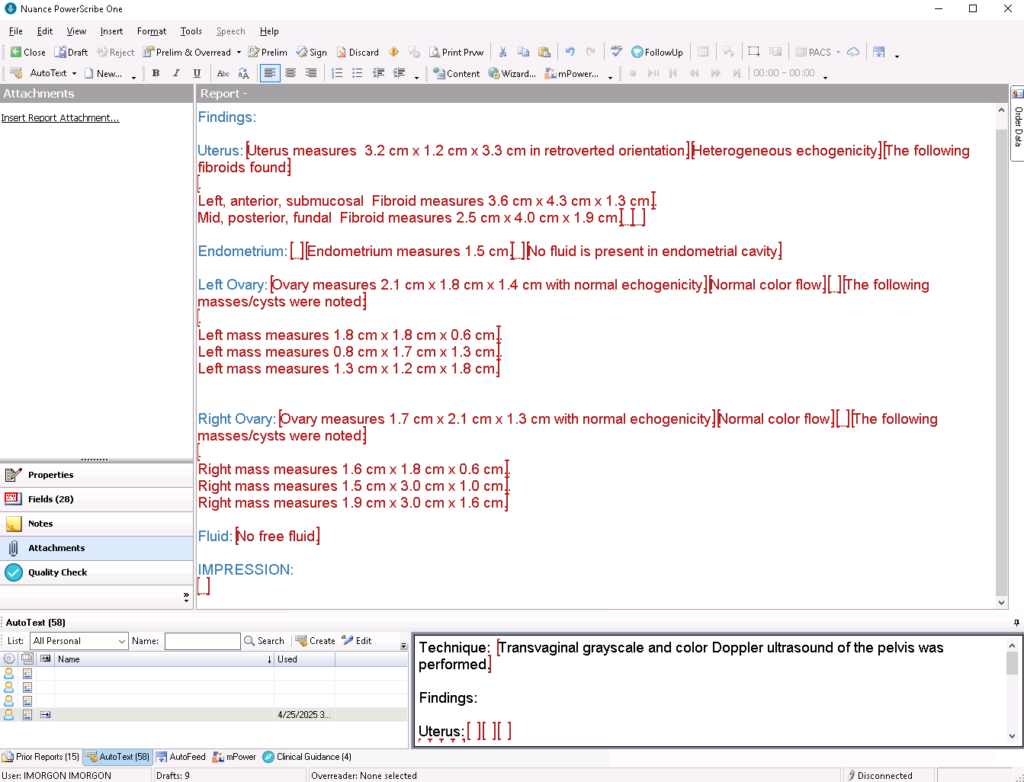
- Exceptions. Masses, cysts, and fibroids are where conditional text pays off: one or two clicks produce the full description, with its own line in the report.
- Only what applies. Worksheets that show every possible field are electronic paper. Good ones hide what doesn’t apply, and work as a checklist that keeps studies comprehensive whoever is scanning.
The result lands in the radiologist’s own dictation system as a drafted report:
Priors and interval change
Finding and retyping prior measurements is slow and error-prone: manual lookups add errors and data-entry delays of 5% to 10%. Imorgon automatically fetches prior measurements and calculates volumes and interval change, such as percent growth since the last exam, so the report includes the comparison before the radiologist opens it.
Guideline calculators and normal ranges
The American College of Radiology (ACR) publishes scoring systems such as TI-RADS and O-RADS to standardize interpretation. When the calculator lives inside the worksheet, the score and its inputs reach the report together, and nobody re-enters the features in a separate tool.
The same applies to normal ranges. A fixed range flags a number; a range for the patient’s age or size explains it, to the radiologist and to the referring doctor. A pediatric kidney length, for example, means little without the child’s age and height. Ask whether the software can apply published reference tables, and whether the report says which one it used.
Enterprise integration
Most imaging centers and radiology practices read MR, CT, X-ray, and more, with ultrasound only about 20% of the workflow, and their radiologists report all of it in one dictation system. Ultrasound reporting software has to fit that workflow rather than add another application.
- Dictation systems: PowerScribe 360, PowerScribe One, Fluency, and others, including custom ones.
- EHR: standard HL7 and FHIR interfaces, with Epic (or another EHR) launching the right worksheet for each patient.
- Exams: every ultrasound exam, from abdominal and pelvic to vascular, thyroid and OB/GYN. The same engine automates other reports too: DXA (bone density), where the scanner’s data is notoriously messy; CT radiation dose; and results from AI programs such as HeartFlow FFR-CT, where Imorgon turns the numbers into a drafted impression.
Specialty systems for OB/MFM, vascular or echocardiography are often excellent in their field, some with AI and cloud options. The trade-off is a separate worklist and application for each specialty, which adds IT overhead. Decide whether you want a specialist tool for one service line or one standard across the department.
Already own ModLink? Read this first
Many PowerScribe sites already own ModLink. It came bundled with the dictation system, and it often sits half-deployed. Before you build on it, know what you’re signing up for:
- It’s do-it-yourself. Every measurement is mapped by hand to a dictation-system field, using DICOM SR codes that include vendor-private ones. Your IT team builds it, and your IT team owns it.
- Nobody keeps it current for you. When a scanner software update changes how measurements are coded, mapped values quietly stop arriving, and the fix goes back on your IT team’s list.
- There are no real worksheets. ModLink moves modality values into custom fields. Its user help describes no screen where the sonographer records findings, so the other half of the report is still dictated.
- Normal limits are one fixed range per field, flagged with an asterisk. Every patient gets the same range, whatever their age or size.
ModLink moves numbers. Imorgon delivers the drafted report: measurements, sonographer findings, priors and guideline calculators, built and maintained by us, with support 24/7/365. (ModLink details: ModLink 3.0.2 User Help, Hyland, 2019.)
Governance
An on-premises deployment keeps protected health information (PHI) under the institution’s physical and logical control, simplifying data-sovereignty and security reviews. Imorgon installs on-premises: patient data stays on your servers, under your security controls.
Operational continuity
Ultrasound runs overnight and on weekends, so reliable support has to run then too: 24/7/365. Ask what happens after go-live, too. Scanner manufacturers change their DICOM SR structures in software updates, and previously mapped measurements can quietly stop transferring. Get a commitment that unmapped measurements will be fixed, and find out who does the fixing: your IT team or the vendor.
Automation also needs IT, sonography and radiology to agree on standardized workflows. A good vendor brings expert guidance on each manufacturer’s DICOM SR structure and your scan protocols, so worksheets fit each department without disrupting reading.
Comparing the three approaches
| DIY (e.g. ModLink) | Specialty reporting system | Imorgon | |
|---|---|---|---|
| Measurements into the report | Yes, once your IT team maps each field by hand | Yes, within its specialty | Yes, every exam, mapped and maintained by us |
| Sonographer worksheets | None | Yes, within its specialty | Yes, findings written as report sentences |
| Normal ranges | One fixed range per field | Varies | Customizable, guideline tables, by age or size |
| Where the radiologist works | The dictation system | Often a separate application | The dictation system |
| When a scanner update breaks a mapping | Your IT team fixes it | The vendor | We fix it, 24/7/365 |
Peer validation
Questions buyers ask
How long does implementation take in a busy radiology department?
Usually a few months. It goes faster when the IT and clinical teams start in parallel, the radiologists and sonographers agree early on which measurements the scanners will send, and the scanner manufacturer’s applications visits are booked right away. The biggest factor is people: a technical lead, a radiologist and a sonographer who can make decisions and have time set aside for the project.
What does ultrasound reporting software cost, and how is ROI calculated?
Most vendors charge a start-up fee plus a per-study fee. Imorgon charges a one-time setup fee in the range of an ultrasound transducer or a single MR coil, then a charge per report. A simple ROI: Imorgon saves sonographers about 2 minutes per exam and radiologists 1 to 2 minutes per report. A radiologist costs $4.50 to $9 a minute (annual salary divided by 2,000 hours, then by 60), and a sonographer $0.50 to $1. Multiply each saving by its cost per minute and by your exams per year, then divide the setup fee by the total. Payback is usually measured in months.
Does it work with PowerScribe One and Fluency?
Yes. Imorgon works with PowerScribe 360, PowerScribe One, Fluency, and other dictation systems, custom ones included. Sites moving from PowerScribe 360 to PowerScribe One keep their Imorgon worksheets.
Does Imorgon use AI to write the report?
No. The report text comes from what the sonographer recorded and what the scanner measured – no hallucinations. Scores, calculations, and normal ranges follow published guidelines, and the radiologist reviews and signs every report.
How does the software keep patient data secure?
With an on-premises deployment, patient data doesn’t leave the institution, so the security review stays inside your own policies. Cloud solutions add exposure: more internet-facing surface, shared multi-tenant storage, and questions about whether data is used for training.
More reading: three features that make ultrasound reporting automatic, why DICOM SR automation is harder than expected, and who we are.